
Multi-media filters are essential components in industrial water treatment systems. They are widely used in pre-treatment processes, circulating water filtration, and other applications where high water quality is required. These filters rely on layers of different media, typically anthracite, sand, and garnet, stacked in decreasing particle size to achieve optimal filtration performance. Despite their robust design, pressure abnormalities are among the most frequent operational issues.
Pressure problems in multi-media filters generally fall into three categories: high inlet pressure, excessive differential pressure (ΔP) between inlet and outlet, and low outlet pressure. Each of these anomalies can significantly affect water treatment efficiency, reduce equipment lifespan, and, in severe cases, cause mechanical failures. Understanding the causes, impacts, and preventive measures for these issues is critical for operators responsible for maintaining industrial water systems.
This article provides a detailed guide to diagnosing and resolving pressure anomalies in multi-media filters, covering root causes, operational consequences, troubleshooting steps, and preventive strategies.
High inlet pressure occurs when the pressure entering the filter exceeds its design specification. For most industrial multi-media filters, the recommended maximum inlet pressure is around 0.6 MPa. Pressures exceeding this threshold may cause filter tanks to rupture, pipelines to leak, or valves and gaskets to fail.
The main causes of high inlet pressure are generally related to flow restrictions at the inlet and uncontrolled system pressure.
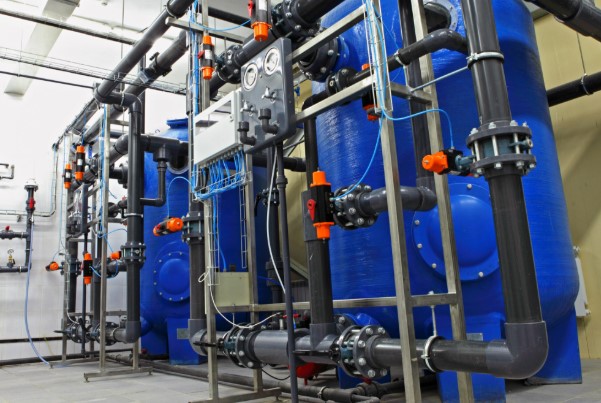
Over time, debris, scale, and rust can accumulate in inlet piping, especially if raw water contains high concentrations of calcium, magnesium, iron, or manganese ions. These deposits reduce the effective flow area of the pipes, restricting water flow and causing pressure buildup at the filter inlet. Additionally, installation residues such as welding slag, gasket fragments, or sand particles may remain in the piping system, further narrowing the flow path.
Valve malfunctions are another major factor. Partially opened manual valves or electric valves with stuck cores create artificial throttling, increasing inlet pressure. Operators must regularly inspect valve positions and ensure full opening during normal operation. A misaligned or partially closed valve can have an immediate effect on pressure and may induce stress on downstream equipment.
Supply pumps, particularly centrifugal pumps, are a common source of high inlet pressure when they malfunction. Examples include:
Pump discharge pressure spikes due to variable frequency drive faults.
Over-speeding of pumps beyond design limits.
Malfunctioning check valves causing backpressure.
In multi-stage or parallel filtration systems, blockages in downstream equipment, such as precision filters, ultrafiltration (UF), or reverse osmosis (RO) membranes, can propagate backpressure upstream, elevating pressure at the multi-media filter inlet.
Air accumulation inside the filter tank can impede water flow, creating a condition known as an air lock. This often occurs during first-time operation, after backwashing, or if the vent valve is blocked or not fully opened. Trapped air prevents the downward flow of water through the media, causing elevated inlet pressure accompanied by pressure fluctuations and unusual noises. Immediate venting is necessary to remove trapped air and restore normal operation.
Excessive differential pressure is the most typical pressure anomaly in multi-media filters. Under normal conditions, ΔP ranges from 0.02 to 0.05 MPa. A sudden rise above 0.1 MPa indicates either the media or system is obstructed.
The primary causes of excessive ΔP include media contamination, ineffective backwashing, and media abnormalities.
When raw water turbidity increases suddenly, the filter media experiences higher loads. For instance:
During the rainy season, runoff may carry cement particles, silt, or clay, increasing turbidity.
Failures in upstream pre-treatment systems may allow more suspended solids into the filter.
If the filter operates beyond the designed backwash interval (e.g., 8 hours designed vs. 12 hours actual), the media pores can become clogged with suspended solids and colloidal particles, increasing flow resistance and ΔP.
In oily wastewater applications, oil films adhering to media particles reduce filtration efficiency while blocking pore channels, leading to a sharp rise in differential pressure.
Backwashing is crucial to restore media filtration capacity. Several factors can lead to incomplete backwashing:
Insufficient backwash flow rate: For example, a design flow of 15 m/h vs. actual 10 m/h cannot dislodge impurities effectively.
Short backwash duration: Designed for 5 minutes, but performed for only 2 minutes.
Faulty backwash system: Blocked valves, damaged distribution pipes, or malfunctioning rotary arms may cause uneven cleaning.
Incomplete backwashing leaves impurities in the media, leading to rapid clogging during subsequent operation. Sticky or viscous residues, such as algae, biofilm, or clay, may require air scouring; failure to execute this results in persistent high resistance in the filter bed.
Media Caking: Prolonged inadequate backwashing leads to hardened layers, preventing water from penetrating and sharply increasing ΔP.
Stratification or Misalignment: High backwash velocities (>20 m/h) can wash out fine particles or invert media layers, disturbing the porous structure and increasing resistance.
Aging and Contamination: Media older than 5–6 years may have worn surfaces or collapsed pores. Exposure to oxidizers or heavy metals in raw water can degrade media, reducing filtration performance.
Distributors at the bottom of the filter tank (e.g., perforated plates or filter caps) and intermediate drainage systems (e.g., headers or branch pipes) can become blocked. This results in backflow of debris, trapped media fragments, and uneven water distribution. Localized high resistance elevates overall ΔP, creating waterlogging or stagnant zones in the tank.
Low outlet pressure, typically below 0.3 MPa, can compromise the supply to downstream equipment. Common causes include insufficient inlet pressure, internal filter blockages, or piping issues.
- Insufficient Front-End Supply: Pump performance deterioration, such as impeller wear, cavitation due to air entrainment, or leaks in supply piping, reduces inlet pressure and subsequently outlet pressure. In such cases, differential pressure may remain normal, but overall system pressure is low.
- Internal Filter Blockages: Blocked media or distributors increase resistance and reduce flow. Even with normal inlet pressure, outlet pressure drops because the flow rate cannot meet design specifications. Operators may notice low outlet pressure, low flow, and increased ΔP.
- Outlet Piping Issues: Leaks due to damaged pipes or flange seals reduce flow and outlet pressure. Worn or stuck valves restrict flow, lowering outlet pressure despite a normal ΔP. Visible water stains at leak points often indicate outlet piping issues.
Pressure anomalies in multi-media filters can have severe consequences, affecting both equipment integrity and operational performance.
- Media Layer Damage: High pressures compact media, reduce porosity, and can dislodge particles, allowing them to enter downstream systems.
- Equipment Damage: Pressures above 0.6 MPa may deform tanks, crack welds, or damage sensors and valves.
- Reduced Backwash and Air Scour Efficiency: Excessive pressure overexpands the media, causing friction wear and potential damage to distribution pipes or air headers.
- Increased Energy Consumption: Pumps work harder, consuming more power, increasing motor wear, and raising operational costs.
- Reduced Filtration Efficiency: Slower water movement reduces flow through media, promoting uneven deposition and short-circuiting, degrading water quality.
- Ineffective Backwashing and Air Scouring: Low pressure fails to clean media properly, leaving residues that quickly clog pores again.
- Negative Pressure and Cavitation Risks: Excessive suction can deform tanks, form air pockets, or cause pump cavitation, damaging impellers.
- Microbial Growth: Slow flow encourages bacterial and algal proliferation, forming biofilms that further obstruct the media.
- Shortened Equipment Life: Both high and low pressures accelerate wear on media, distributors, and tanks.
- Impaired Downstream Processes: As pre-treatment for RO or UF systems, unstable multi-media filter pressure can compromise downstream water quality and accelerate membrane fouling.
A systematic approach is essential for identifying and resolving pressure abnormalities efficiently.
- Identify the type of anomaly: high inlet, high ΔP, or low outlet pressure.
- Review operational data: turbidity, runtime, backwash history, pump pressure, and flow rates to identify external causes.
- Inspect the filter system: media condition, valve operation, and distributor integrity.
Following these steps allows operators to narrow down root causes and implement targeted corrective measures.
- Real-Time Pressure Monitoring: Install inlet and outlet pressure gauges with alarm thresholds. Set alerts for high pressure (>0.5 MPa) or low pressure (<0.1 MPa) to ensure timely intervention.
- Regular Maintenance: Check piping, valves, media, and distribution devices to prevent blockages and ensure consistent filter performance.
- Standardized Operation: Avoid sudden valve operations to prevent pressure shocks. Maintain backwash and air scour pressures within design ranges: Backwash water pressure: 0.2–0.3 MPa; Air scour pressure: 0.15–0.2 MPa.
- Prompt Fault Response: Shut down the system immediately when issues such as pump failures, leaks, or distribution blockages occur. Replace or repair damaged components and refresh or replace media when necessary.
Pressure abnormalities in multi-media filters are common and may arise from structural, operational, or procedural factors. Proper understanding of their causes, impacts, and solutions is essential for maintaining filter performance and ensuring downstream water quality. By employing systematic troubleshooting, preventive maintenance, real-time monitoring, and standardized operations, operators can mitigate the risk of equipment damage, improve filtration efficiency, and extend the service life of multi-media filters. Regular inspections and careful monitoring of pressure trends ensure that filters operate optimally, providing a reliable water supply for industrial processes.